
Table of Contents
ToggleThe Foundation of Manufacturing Precision
Ever wondered why some discrete manufacturing projects run smoothly while others constantly face delays and cost overruns? The answer often lies in how well companies manage their Bill of Materials Software (BOM). According to Forrester Research, engineers spend up to 159 hours per year on administrative BOM tasks.
Think of a BOM as the blueprint that connects engineering, procurement, and production. Poor BOM management creates a domino effect: incorrect parts get ordered; production schedules slip, and costs escalate beyond budget. On the flip side, effective bill of materials software gives manufacturers better control, faster turnaround times, and a real competitive edge.
This guide walks you through everything discrete manufacturers need to know about modern bill of materials software. Whether you’re still relying on spreadsheets or evaluating a better system, you’ll discover practical strategies to reduce errors and speed up operations.
What is a Bill of Materials (BOM) in Discrete Manufacturing?
Bill of Materials (BOM) is a structured list of all the raw materials, components, parts, and sub-assemblies needed to build a finished product. It’s the central document that connects engineering designs to actual production.
Modern BOM management software changes this. Beyond improving accuracy, it helps to accelerate your entire sales process. Sales teams get error-free product data, automated pricing, and faster configuration for custom orders. For Engineer-to-Order and Make-to-Order manufacturers, this means generating quotes in minutes instead of days, enabling sales teams to close deals while customer interest is at its peak.
Key Pain Points in Traditional BOM Management Process
Discrete manufacturers face common problems: incorrect data, manual repetitive work, & compliance issues. These slow down your sales process and may impact your customers’ expectations. If you’re using spreadsheets or multiple standalone systems, you’ve probably experienced:
1. Quote Delays from Outdated Information
Manual errors and outdated part data slow down quotes and approvals. Sales cycles stretch. Your team can’t respond fast enough, and deals go to competitors.
2. Assembly Errors That Impact Delivery Performance
Overlooked components or duplicate parts disrupt production schedules and extend delivery timelines. These inefficiencies not only frustrate customers but also erode trust and damage long-term business relationships.
3. Unplanned Costs Eating into Margins
Without real-time BOM data, procurement makes rushed, expensive purchases. These unplanned costs erode your competitive edge. Budget overruns become a recurring operational challenge.
4. Information Scattered Across Multiple Systems
When teams work across different systems like CAD, ERP, and CRM, collaboration gets harder. Data silos slow decisions and lead to inefficiencies and miscommunication.
5. Lost Deals Due to Slow Response Times
Manual quoting processes delay your response time. While your team compiles data and prepares proposals, competitors with automated systems respond faster, present offers sooner, and close deals first.
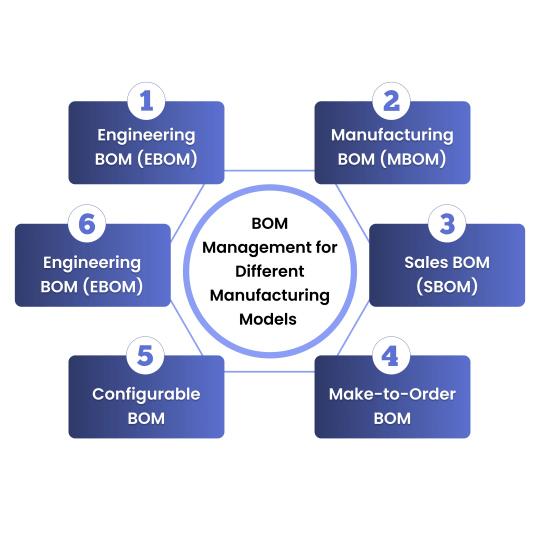
Different manufacturing models require bespoke BOM solutions:
1.Engineering BOM (EBOM): Created during the product design phase, EBOM lists all components from an engineering perspective, including CAD references, specifications, and design intent without manufacturing or assembly considerations.
2.Manufacturing BOM (MBOM): Production-focused structure re-organizing EBOM components by assembly sequence, work centers, and manufacturing processes. Includes tooling, consumables, scrap allowances, and detailed shop floor instructions for production teams.
3.Sales BOM (SBOM): Customer-facing product structure for quoting and ordering. Groups components into sellable units, applies accurate pricing logic for quotations, and hides internal manufacturing details from stakeholders.
4.Make-to-Order BOM: Variant-based structure for standard products with customer-specific options. Manages product families with predefined variations, enabling quick configuration, accurate quotes, and faster order processing while maintaining inventory control across variants.
5.Configurable BOM: Dynamic structure with selectable options and rules-based configurations. Enable custom product variations without creating separate BOMs, accelerating quotation cycles, and supporting engineer-to-order and make-to-order manufacturing models efficiently.
6.Multi-Level BOM: Hierarchical structure showing parent-child relationships across assemblies, sub-assemblies, and components. Provides complete product breakdown from finished goods down to individual raw materials and purchased parts for accurate costing and quotes.
Bill of Materials Software: Essential Features You Should Look For in 2026
Not all BOM software delivers the same value. As you evaluate solutions in 2026, we recommend prioritizing these essential capabilities that separate basic tools from true manufacturing platforms.
- Real-Time Collaboration Across Teams
Engineering, procurement, finance, production, and sales should work from the same live data. This eliminates version confusion and ensures everyone makes decisions based on current information. - CAD Integration and Automated BOM Extraction
Manual data entry wastes time and introduces errors. The right software pulls BOM data directly from your CAD files, maintaining accuracy while speeding up workflows. - ERP and PLM Synchronization
Seamless integration between systems ensures data flows automatically. Breaking down silos means no more manual updates or reconciling conflicting information across multiple platforms. - Configurable Product Structures for Custom Orders
Engineer-to-Order and Make-to-Order manufacturers need flexibility. Your software should handle complex configurations and variations without requiring custom coding or workarounds for every project. - AI-Powered Validation and Error Detection
Catch mistakes before they reach production. Smart validation automatically identifies conflicts, flags, obsolete parts, and highlights missing components, saving you from costly production delays. - Advanced Reporting and Analytics
Gain visibility into cost trends, supplier performance, and BOM accuracy. Data-driven insights help you identify bottlenecks, optimize processes, and make smarter strategic decisions.
The question isn’t whether you need BOM software, it’s whether your system brings all these capabilities together seamlessly. That’s exactly where Mearas’ Bill of Material Management Software (BOM) stands apart, combining these essential features into one unified platform designed specifically for discrete manufacturers.
How Mearas Enables Seamless BOM Integration
Mearas’ AI-driven precision ensures accurate product/part selection, configuration, design, and costing. Engineering teams build BOM directly through CAD programs while our AI algorithms and Generative AI solutions streamline creation. Our bill of materials software enables seamless data flow across every department and touchpoint, integrating with CAD, ERP, and CRM systems. Deployed in just 2–3 weeks using a pay-as-you-build model, Mearas provides traceable visibility into BOM and product details. This accelerates quoting, reduces errors, and speeds up custom order approvals, helping discrete manufacturers close deals faster and boost sales velocity.
Mearas' AI-Powered BOM Workflow: From Design to Quote in Minutes
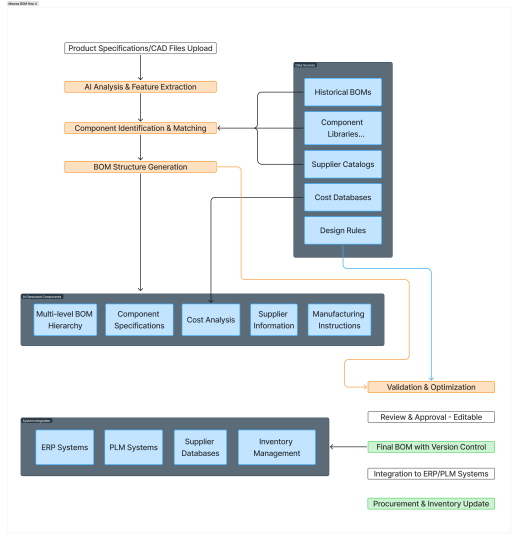
Mearas’ AI-Driven BOM Creation & Product Configuration
- AI-Optimized Component Selection
AI algorithms automatically identify and select the right parts for each assembly, ensuring accuracy while eliminating manual errors and reducing configuration time significantly. - Standardized BOM Templates
Pre-built templates maintain consistent hierarchical structures across all product variants, streamlining documentation processes and ensuring uniformity in complex manufacturing environments. - Real-Time Costing
Instantly calculates material, part, and assembly labor costs as configurations change, enabling sales teams to generate accurate quotes without delays or pricing errors. - Inventory and Availability Check
Real-time verification of stock levels and supplier lead times prevents procurement delays, allowing teams to commit to realistic delivery schedules and avoid customer dissatisfaction.
Sign Up for Mearas' Bespoke BOM Management Software
We make BOM onboarding effortless, so your team can focus on production, not setup. Our specialists provide tailored integration with your existing CAD, ERP, or CRM systems. We configure your BOMs, build intuitive templates, and connect live data for inventory, suppliers, and costing. Your team gains the skills to create BOMs, manage real-time updates, and streamline approvals with practical, hands-on training.
Throughout implementation, we’re available by call or message for immediate support and troubleshooting. This ensures that your engineering and production teams can quickly gain access to accurate, fully integrated BOMs that are customized to your unique products and workflows.
Ready to transform your BOM process? Schedule your free consultation today.

FAQs
A Bill of Materials (BOM) in manufacturing is a comprehensive, structured list of all raw materials, components, parts, sub-assemblies, and quantities required to manufacture a finished product. It serves as the central blueprint connecting engineering designs to actual production, ensuring all departments work with accurate product information.
- Real-time collaboration across engineering, procurement, production, and sales teams
- Automated BOM extraction directly from CAD files, eliminating manual data entry
- Seamless ERP/PLM integration for unified data flow across all systems
- AI-powered error detection that catches mistakes before they reach production
- Faster quote generation for custom orders, reducing sales cycle time
- Advanced analytics providing visibility into costs and supplier performance
Poor BOM management leads to quote delays, assembly mistakes, unplanned procurement costs, scattered information across systems, and lost deals due to slow response times. These issues cause production delays, budget overruns, damaged customer relationships, and reduced competitive advantage in the marketplace.
Modern BOM management solutions like Mearas can be deployed in just 2–3 weeks using streamlined implementation processes. This includes CAD/ERP/CRM integration, BOM template configuration, team training, and ongoing support to ensure engineering and production teams quickly access accurate, fully integrated BOMs customized to their workflows.
- Eliminates manual errors in product configuration and pricing
- Provides sales teams with instant access to accurate part data
- Automates quote generation for custom orders in minutes instead of days
- Ensures real-time cost calculations as configurations change
- Verifies inventory availability before committing to delivery dates